 Trove
TroveRecipe saver app: how to save recipes from TikTok and Instagram Reels, even voice-only ones
The dinner you wanted to make exists only as a 40-second video where someone talks through the ingredients over a sizzling pan. The caption says "you NEED this 🤤". Here's how to actually keep the recipe, and which kind of recipe saver app is worth installing for it.
Video recipes get lost for three compounding reasons. The steps are spoken, not written. Captions are often empty or vibes-only. And neither TikTok nor Instagram lets you search your saves, so even a bookmarked recipe means scrolling thumbnails hoping to recognize the pan. The fix depends on how much you cook from videos. Four methods, cheapest first. I've gone by what each app documents and charges today rather than any lab test, and I build one of them, so weigh Method 4 accordingly.
Method 1: the manual route (screenshot, pause, type)
The free classic: screenshot the ingredient list if one flashes on screen, or pause-and-type the spoken steps into Notes. This holds up if you save one or two recipes a month and cook them within days of saving. It breaks at any real volume. Transcribing a talked-through recipe takes several minutes of pause-rewind-type, screenshots catch one frame of a multi-step process, and your Notes app slowly becomes its own unsearchable pile of "Untitled 47". Most people do this twice and quit.
Method 2: in-app collections, filing without findability
Making a "Recipes" collection on TikTok or Instagram (long-press the bookmark icon to file at save time) at least separates food from everything else. But it's filing, not saving: the recipe is still locked inside the video, the collection can't be searched, and if the creator deletes the post your recipe evaporates. Collections are a decent index; they are not a cookbook. Deeper dives: organizing saved TikToks and organizing saved Reels.
Method 3: dedicated recipe managers
If cooking is the whole point for you, with meal plans, grocery lists, and recipe scaling, a dedicated recipe app is worth a look. Two worth knowing, as of this writing:
- ReciMe imports recipes from TikTok, Instagram, and websites into clean recipe cards with grocery lists. There's a free tier with a cap on imports, and full access is subscription-priced. Best-in-class if your saves are 100% food — and if you've bounced off its trial gate, there's a longer list of ReciMe alternatives.
- Flavorish adds AI-assisted meal planning and pantry tracking on top of recipe importing. Freemium, with paid tiers.
Below those sit a long tail of lighter importers that just make a tidy box of recipe cards, and they all share the same ceiling: import quality depends on how the recipe exists in the source. A recipe written in the caption imports beautifully. A voice-only video is at the mercy of the app's transcription. And everything you save that isn't food (the restaurant, the gadget, the travel video) needs a second app.
Method 4: AI save apps, one library that reads everything
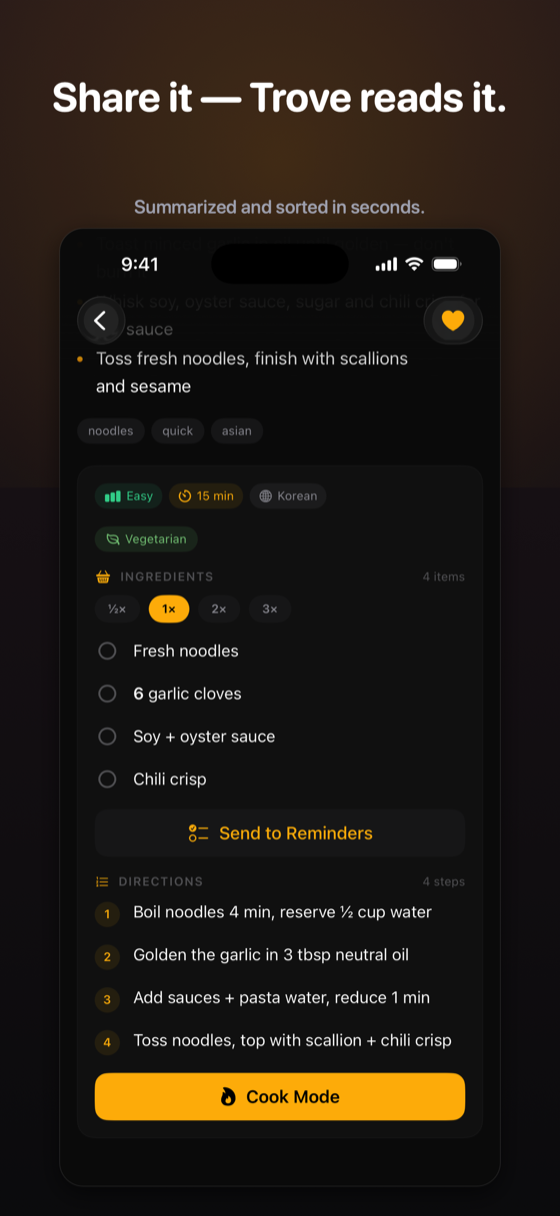
Disclosure: Trove is mine, and this is the part where I'm selling you something. The idea behind it: instead of a recipes-only tool, one library that reads everything you share and recognizes what each save is. Share a cooking video and Trove transcribes the audio, detects it's a recipe, and extracts the ingredients (with scalable quantities), the steps, timing and difficulty, even when nothing was written down. The save lands under Recipes automatically, next to the places, products, and gift ideas it detected from your other saves.
Finding it later is the difference-maker: ask "what was that dal with the burnt-garlic tarka?" and Ask Trove answers from your saves, citing the exact video. There's also a Cook Mode for actually making the dish, and ingredients can be sent to Reminders as a shopping list.
Dedicated recipe app or universal save app?
The fork most roundups skip, and the one that actually decides which app you install:
- Pick a dedicated recipe manager (ReciMe, Flavorish) if food is your whole saving life and you want meal planning, pantry tracking, and grocery-list workflows as first-class features.
- Pick a universal save app (Trove) if recipes are one of many things you save — because the real-world save pile is recipes and the café for Saturday and the lamp for the hallway, and splitting it across three single-purpose apps is how things get lost again.
Step-by-step: TikTok → Trove → ask for it next week
- On the video, tap Share, then Trove. That's the whole capture, about two seconds, and you never leave TikTok. If you'd rather not use the share sheet, copy the link instead: open Trove and it spots what's on your clipboard and offers to keep it.
- Trove reads it in the background, transcribing the narration, pulling out ingredients and steps, tagging cuisine, time, and difficulty, and filing the whole thing under Recipes.
- Next week, ask for it: "what was that dal with the burnt-garlic tarka?" The answer comes back with the recipe and the original video cited, so the creator is one tap away.
Pricing, plainly: the download is free and comes with 100 credits. Reading a shared video uses one, and Ask Trove questions draw from the same pool. Those 100 are a one-time pool rather than a monthly allowance, and they don't expire. Unlimited AI is $2.99/month or $19.99/year, with no free trial. Saving stays free and unlimited either way, and nothing you've already saved disappears when the credits run out. iPhone-only, iOS 17+.
Troubleshooting the weird cases
- Recipe only in a pinned comment: transcription doesn't read comments, so paste the comment text into the save's notes, or screenshot it and keep that alongside.
- Compilation videos ("5 dump dinners in 60 seconds") come back as one summary covering all five rather than five clean cards. If the creator also posted them individually, save those instead.
- Recipes in another language transcribe well across the major ones. Niche dialects and heavy music-over-voice mixes are where it slips, so check the quantities before you shop.
- Recipes shown on screen but never spoken, all text overlay and no narration, usually get caught by the visual read, but this is the case most worth ten seconds of your own checking.
FAQ
How do I get the recipe from a TikTok video?
Check the caption and pinned comments first, since many creators paste the recipe there. If it's only spoken in the video, either pause and type it out manually, or share the video to an AI app like Trove, which transcribes the audio and extracts ingredients and steps automatically.
Is there an app that pulls recipes from Reels?
Yes, in two forms. Dedicated recipe managers import a social video link into a recipe card with a grocery list. Universal AI save apps like Trove transcribe any shared video and extract the recipe when one is present, alongside every other kind of save.
How do I save a recipe that's only spoken in the video?
Voice-only recipes need transcription. Do it manually (pause, type, repeat), or share the video to an app that transcribes it for you. Trove turns the spoken recipe into written ingredients and directions, and keeps the link to the original video.
What's the best free way to save TikTok recipes?
Fully manual, a tight TikTok collection plus Notes for the recipes that live in the caption, costs nothing. With AI, Trove is free to download and comes with 100 credits, each one covering a full read of a shared video, and most recipe managers have a free tier with a cap on imports. Either route is enough to learn whether the workflow sticks before you pay for it.
Can AI turn a cooking video into a written recipe?
Yes, reliably for clearly narrated videos. Transcription plus extraction converts a talked-through cooking video into structured ingredients and steps. The failure modes worth knowing are noisy audio, rapid multi-recipe compilations, and recipes shown on screen but never spoken, so those are worth a quick check before you shop.
Never lose a recipe to your saves again
Share the video to Trove and get back written ingredients, steps, and an answer when you ask for it next week.

Free download · 100 free credits · Pro from $2.99/mo · iPhone, iOS 17+