 Trove
TroveTurn your saved travel TikToks and Reels into an actual trip
Somewhere in your saves is a whole trip: the ramen counter, the rooftop bar, the neighborhood someone said was "the real" part of the city. Forty videos, saved across two apps and six months. Then you book the flights and can't find a single one of them. Here's the workflow that fixes it.
The saved-travel-video graveyard has a specific shape: TikTok collections you forgot you made, Instagram saves with no search, screenshots of maps with no context, and a group chat where someone definitely posted that beach. The problem isn't discovery. Social video is the best travel discovery engine ever built. The problem is that saves aren't plans. Between "saved it" and "standing there" sit five concrete steps.
Step 1: Get every trip save into one place
Stop splitting saves across TikTok collections, Instagram bookmarks, and your camera roll. Pick one library outside the platforms, and from now on, when a travel video crosses your feed, share it there in the moment. About two seconds, done. This single habit is most of the battle: a trip you can plan is a trip whose raw material sits in one searchable pile, not five unsearchable ones.
For the backlog, skim your existing TikTok "travel" collection and Instagram saves once, and re-share only the keepers. Backlog triage is also where copy-link capture earns its keep: on a video whose share sheet is being difficult, copy the link, switch to Trove, and it spots the copied link and offers to keep it, so you can work through a batch without fighting a share menu each time. (Tactics for that triage: organizing saved TikToks · organizing saved Reels.)
Step 2: Extract the actual places
A saved video is not a destination; the place inside it is. Two ways to get it out:
Manual: replay each video, catch the name (spoken at speed, or flashed on screen for 0.8 seconds), Google it, confirm it's the right branch, pin it in Google Maps or Apple Maps. Fifteen to twenty videos in, this is an evening.
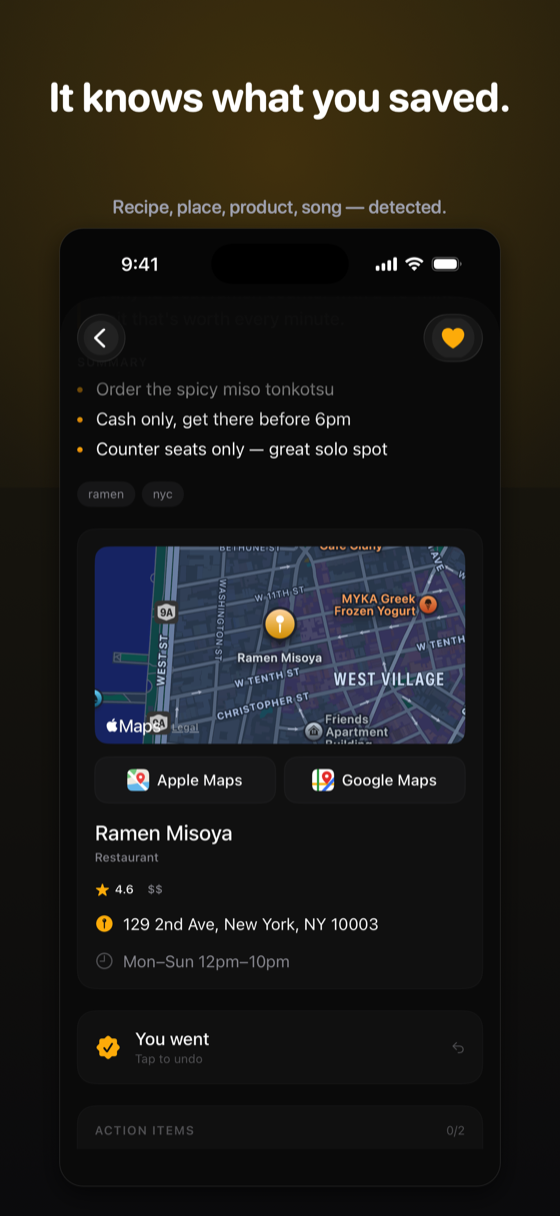
The automatic route is where Trove earns its place in this workflow. I built Trove, so treat what follows as an interested recommendation. Each travel video you share gets transcribed on our servers, and when a place is featured, Trove detects it and attaches the real-world details: name, address, hours, price level, and a map with one-tap Apple Maps and Google Maps buttons. A single dense city video can yield half a dozen spots. Thirty travel videos become a list of real, mapped places, each still linked to the video that sold you on it.
Those places don't stay a flat list. Once a few of them share a city, Trove groups them into a trip of their own — "New York · 6 spots" — puts the whole set on one map, and gives you Route all stops to walk or drive them in a sensible order. The line it doesn't cross is the schedule: Trove won't decide that the sushi counter is Tuesday at 7, hold a reservation, or hand you a printed day plan. It gets you a mapped, grouped, routable city; the hours-and-days part is still yours (or the next tool's). Montage videos that never name the place will also stump it, the same way they stump a human watching twice.
Step 3: Ask across your saves
Once your saves live in one AI-readable library, planning turns into asking: "Which cafés did I save for Tokyo?" "What did I save about Lisbon nightlife?" "Everything I saved with a rooftop." Ask Trove answers from your own saves and cites the exact videos, so you can rewatch the thirty seconds that made you save something before you commit a morning to it. This is the step no folder system can do — folders group; they can't answer.
Step 4: Turn the grouped map into days
A routed map of a city is enough plan for a lot of trips. When you need real times, bookings, and someone else's opinion in the document, that's a different craft, and dedicated tools do it well:
- Wanderlog is the full-featured trip planner, with collaborative itineraries, maps, budgets, and reservations. Best once the places are chosen, and its free tier is generous.
- A newer crop of social-video trip planners converts videos or links straight into itinerary-style output; Reelstrip and ReelTravel are two, as of this writing. Worth a look, though this end of the market churns and extraction quality still depends on how clearly a video names its places.
- The floor is a maps-app list: one Google Maps list per city, pins color-coded food versus sights. Works offline, costs nothing.
In practice, two tools cover it: a save app that understands your videos and gathers them into a city, plus an itinerary builder when the trip needs a schedule rather than a shape. One app rarely does both ends well, and the ones that claim to usually do the second half badly.
Step 5: On the ground
The payoff moment: you're standing in a neighborhood at 6pm, hungry. Instead of re-scrolling TikTok, you ask your library "what did I save near Shibuya?" and the ramen counter you saved in March surfaces with its address, hours, and the original video. Saves that answer in the moment are the difference between a plan and a vibe.
The tools, compared
| Tool | What it extracts | Platforms | Price | Answers questions? | Groups a city | Day-by-day schedule |
|---|---|---|---|---|---|---|
| Trove | Places, often several per video, plus recipes/products from any save; full transcript | iPhone | Free (100 credits); Pro $2.99/mo | Yes, cited from your saves | Yes, trip groups on one map with Route all stops | No |
| Wanderlog | Nothing from videos; you add places | iOS, Android, web | Free; Pro tier | No | Yes, per trip you create | Yes, excellent |
| Social-video trip planners | Places from travel videos and links | Mobile/web | Freemium | No | Per video or link | Itinerary-style output |
| Google/Apple Maps lists | Nothing; manual pins only | All | Free | No | One list per city, by hand | Roughly, via pins |
Worked example: 12 Tokyo videos → a 3-day shape
Here's how it plays out with a dozen Tokyo videos. You share all twelve over one coffee, a couple of minutes of tapping. Reading them turns the pile into five food spots (two ramen, a sushi counter, a jazz kissa, a konbini order someone talked through), three neighborhoods, two viewpoints, an onsen day trip, and one packing video that gets filed as a tip rather than a place. They collect themselves into a Tokyo trip on a single map. Ask "which food spots did I save in Tokyo?" and you get the five back, each citing its video, each with a map. Then the clusters make the days obvious: east-side food one day, the Shimokita end plus the jazz kissa the next, day trip third, and Route all stops handles the walking order within each. The point of the example is the ratio: an evening of replaying videos becomes a coffee, on research you'd already done by scrolling.
FAQ
Is there an app that turns TikToks into an itinerary?
Two kinds of apps split this job. Save apps like Trove pull the places out of each travel video you share, group them into a trip for that city, put the whole set on one map with a route through all the stops, and answer questions across your saves. Dedicated trip planners such as Wanderlog then turn chosen places into a day-by-day schedule with times, bookings, and collaborators. Expecting one app to do both ends well is how you end up doing it manually.
How do I save places from Instagram Reels to a map?
Manually: pause the Reel, identify the place name, and pin it in Google Maps or Apple Maps. Automatically: share the Reel to Trove. It detects the place, attaches the address, hours, and a map with Apple Maps and Google Maps buttons, keeps it linked to the original video, and once you've saved a few in the same city it groups them into a trip you can route in one go.
How do people plan trips with TikTok in 2026?
TikTok and Reels have become the discovery layer for travel, and people save videos of cafés, viewpoints, and neighborhoods for months before a trip. The working pattern: funnel every save into one library, extract the actual place names, let them group by city on a map, then shape the days there or in an itinerary builder. The people who pull it off aren't more organized. They just stopped leaving their research trapped in two apps that can't search it.
Can AI extract locations from a travel video?
Yes. AI can transcribe the narration, read on-screen text and captions, and identify the place being featured. Trove does this per saved video, attaching the venue's name, address, and map. The limit worth naming: videos that never say where they were shot, the pure aesthetic montages, stump every tool, including your own memory.
Your saved videos are already a trip
Share them to Trove and get mapped places, grouped into a trip per city with a route through the stops, every recommendation's video one tap away.

Free download · 100 free credits · Pro from $2.99/mo · iPhone, iOS 17+